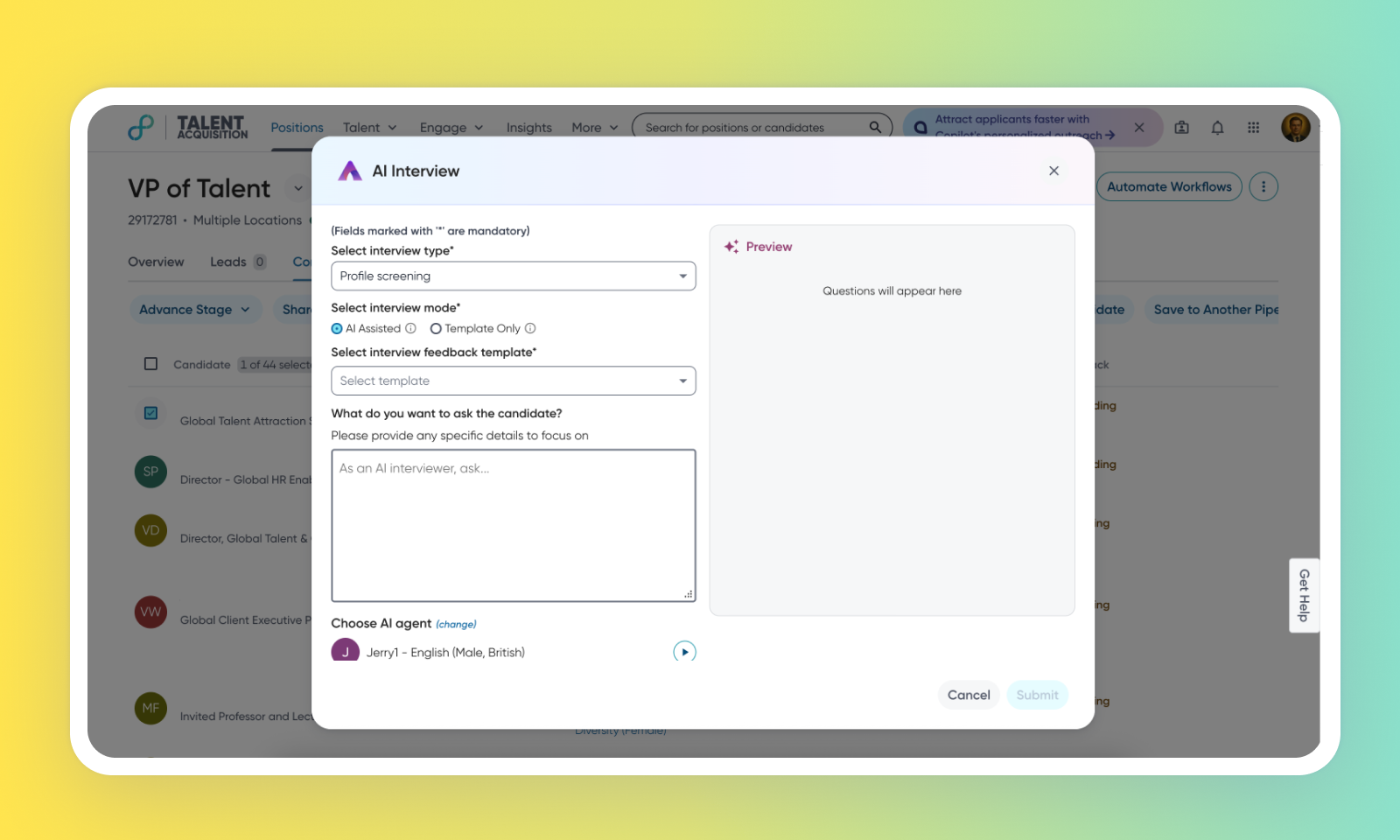
AI Interview mode selection
Default Off
This feature introduces distinct variants for the AI Interview (AII) agent, providing users with enhanced control and flexibility during the interview process. It enables you to tailor their interview approach based on specific requirements.
Users can now opt for one of the following interview modes. These modes can be selected during interview setup through the updated configuration panel. The selected interview mode is stored and retrieved at the time of the interview prompt, enabling the AI to dynamically switch between strict and default questioning approaches.
AI Assisted
Maintains the existing intelligent interview planning and execution capabilities
AI autonomously develops questions based on candidate profiles and job requirements
Supports custom recruiter guidance and additional interview parameters
Provides flexible, adaptive interview experiences
Template Only
AI Interviewer conducts structured interviews using predefined feedback forms
Draws questions directly from pre-selected evaluation criteria
Ensures consistent, standardized interview processes across all candidates
Requirements
This feature requires AI Interviewer to be enabled in the Admin Console.
Users
Customer Admins, Recruiters
Needs addressed
The existing AI Interviewer workflow provides the AI with freedom to plan and execute interviews, sometimes leading to questions that deviate from specific feedback forms. Recruiters also expressed concerns about a perceived lack of control and sought a simpler, more controlled adoption path for the AI Interviewer.
To address these needs, two distinct variants for the AII agent are introduced.
The AI Assisted mode maintains the current AI's freedom to plan and execute the interview, allowing users to add additional guidance to modify questions.
The Template Only mode ensures the AI agent asks questions only based on the provided feedback form, without requiring additional guidance during scheduling.
The Template Only mode directly enables the AI to follow the recruiter's instructions and the feedback form as closely as possible, eliminating deviations. This provides recruiters with greater control over the interview questions and ensures the explicit confirmation of information already available on the resume, if desired.
For more details on how to work with AI Interviewer, read Set up Interviews using AI Interviewer.
Impact on existing workflows
A new step, Select interview mode is introduced to the recruiter's workflow when scheduling an AI interview.
This feature is currently applicable only for the ‘Profile Screen’ AI interview type.
For the Template Only mode, customers must choose a feedback form when scheduling the AI interview.
For customers using the Template Only mode, changes to interview questions can be made by editing the interview feedback form.
Initial setup
For further details and assistance, contact your dedicated Account Executive or Customer Success Manager.
