- DATE:
- AUTHOR:
- The Eightfold team
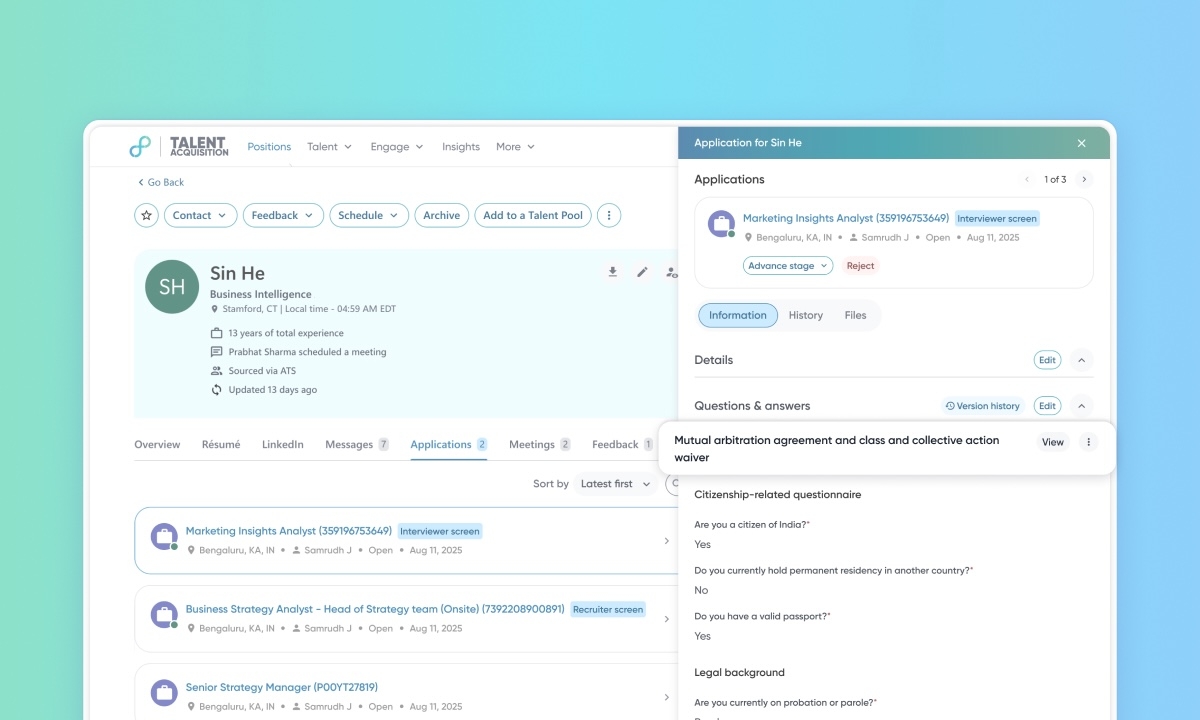
Download candidate-signed agreements
Default Off (Self-service)
Who: Customer Admins, Recruiters
Requirements: Organizations must be using PCS IX (Candidate Experience) and configure global questionnaires within the General Apply Settings in the Admin Console. This feature isn't available for requisition-specific questionnaires or applications synced from an external ATS.
What's new: This feature enables the download of signed PDF documents from application question sections, addressing critical legal compliance mandates. The system dynamically appends essential "runtime" metadata—including candidate signatures, timestamps, and IP addresses—to the static document to ensure a verifiable, legally binding record. By replacing manual data retrieval processes, this enhancement significantly reduces audit risks and improves document management efficiency.
How it works: Admins can enable the ‘Download Config’ setting for specific question sections in the PCS IX section of the Admin Console. Once a candidate submits an application, the system generates a PDF that recruiters can view and download directly from the Pipeline Activity > Applications > Files tab in the candidate's application details.
