Communities 2.0
Default on
Who: Customer Admins, Recruiters, Sourcers, Community Managers
Requirements: Admins need to configure custom fields, home page filters and columns, pipeline actions, and enable kanban view to fully utilize the Community 2.0 functionalities.
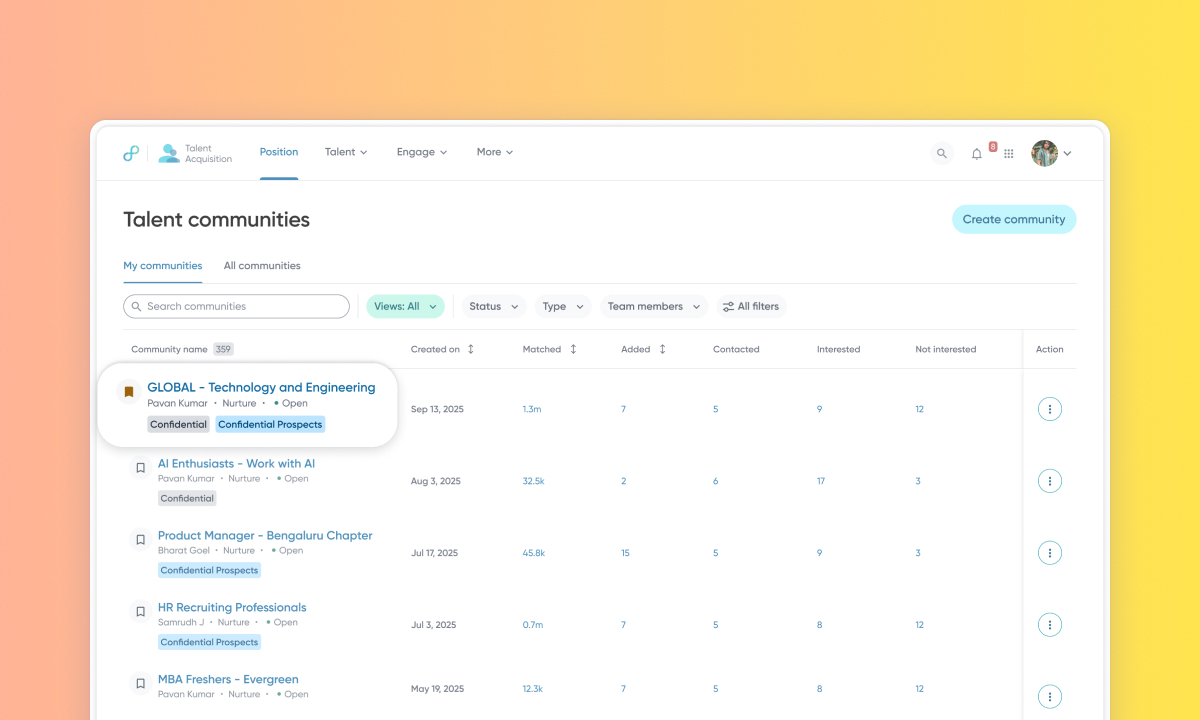
What's new: This release delivers a reimagined community experience for talent pool management with faster navigation, and streamlined workflows.
Custom fields: Customers can define organization-specific fields like business group, region, or organization to standardize categorization and enable reporting in Data Hub.
Navigation and bookmarking: Bookmark frequently used communities to pin them to the top of your list. Clickable metrics in the home page let you drill down directly into specific pipeline stages with a single click.
Saved views and advanced filtering: Save your favorite filter combinations for quick access. Filter by status, type, team members, or custom fields using the new side panel.
Rejection workflow: Remove unsuitable prospects from active views with a dedicated Reject action. Rejected prospects move to a separate view with a full audit trail.
Invite to apply: Send apply to a position link to interested prospects directly from a community.
Kanban view: View candidate profiles as visually distinct cards organized into customizable columns based on their status. Note: This enhancement is Default Off. Read Configure Kanban view in Communities to enable this for your environment.
How it works: Navigate to Talent > Communities in Talent Acquisition to view these enhancements.
To know more, see this video:
