- DATE:
- AUTHOR:
- The Eightfold team
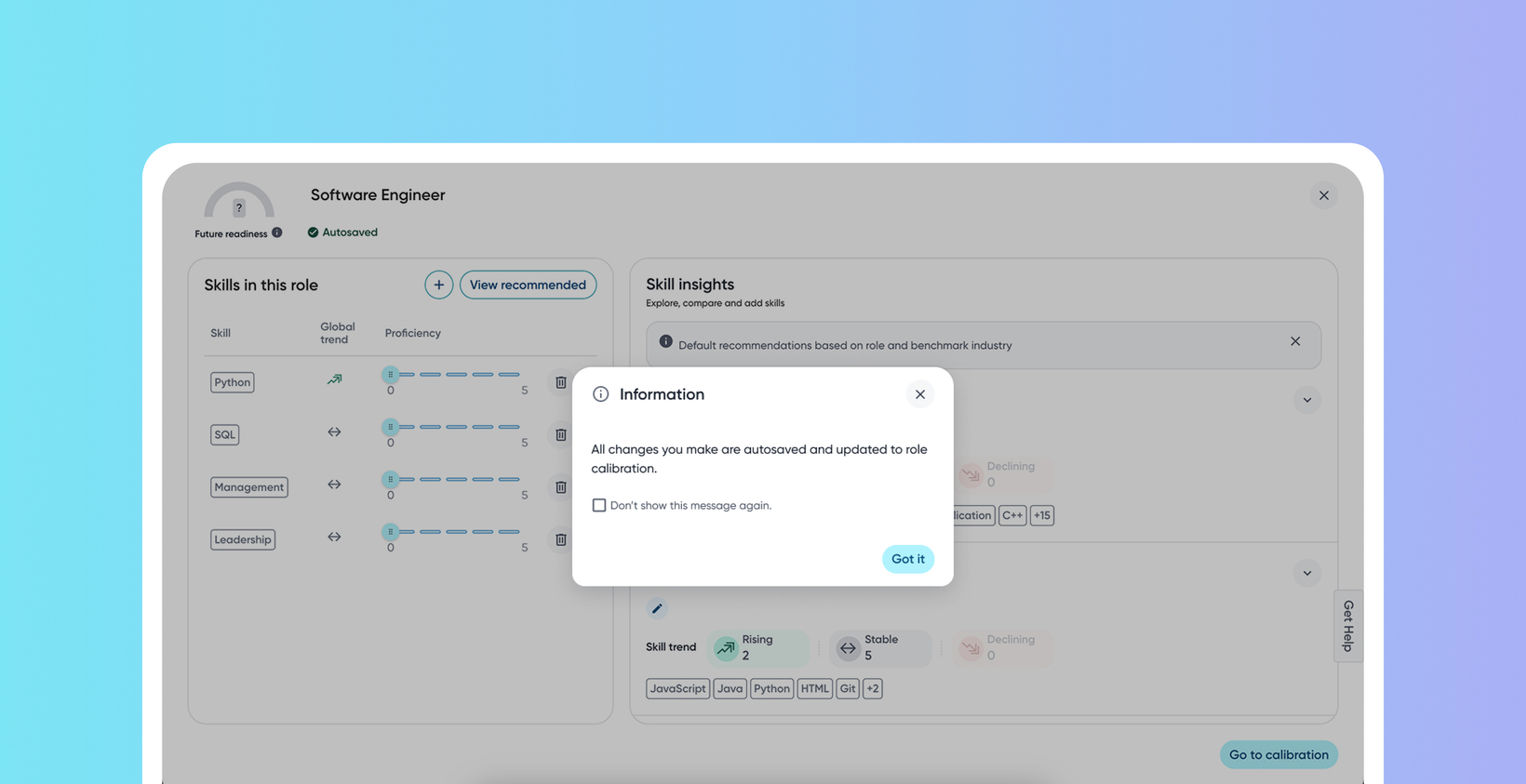
Ability to confirm skill recommendations
Default on
This new feature introduces a clear confirmation pop-up when you access the skills recommendation modal from the Role Calibration page. A new pop-up confirmation message explicitly informs you that all calibration changes are autosaved and instantly updated to the role calibration, preventing unintentional changes.
Users
Talent Admins, HRBPs
Requirements
This feature is integrated within the existing Role Calibration page and appears when clicking View Recommended Skills.
Value
Previously, in some instances, users were under the impression that the skills recommendation (accessed by clicking View Recommended Skills on the Calibration page) was a "sandbox" environment for experimenting without impacting the live role calibration. This perception led to unintentional changes to role calibrations, prompting customer requests for clearer messaging to avoid surprises.
A prominent pop-up window now appears before the skills recommendation modal opens. This direct communication ensures users are fully aware of the impact of their actions, improving transparency and control. Frequent users also have the option to click Don't show this message again to streamline their workflows. This disables the pop-up message for all roles for that particular user.
Initial setup
This feature will be available to customers by default. Customers don't need to do anything to see this change in their Eightfold environment by the sandbox and GA dates.
To know more about this feature, see this video:
