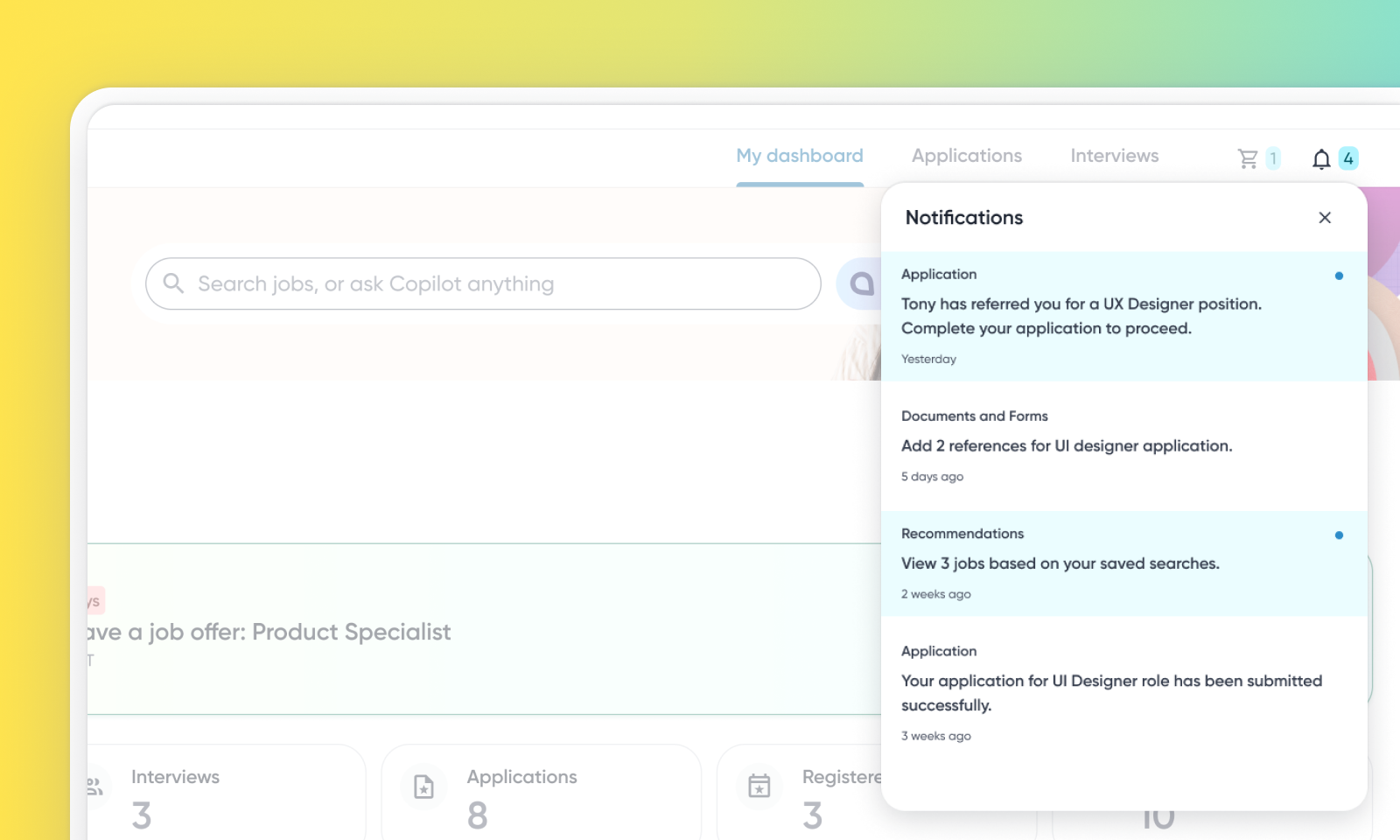
Candidate Notification Center
Default On
The new Candidate Notification Center is a centralized in-app hub for candidates to view notifications and required actions. This feature addresses the limitations of previous My Tasks and My Actions sections and reduces reliance on email for informing candidates. It provides a seamless experience for candidates to stay informed and quickly respond, ultimately reducing the time to action.
Note: Currently, this feature is only available for Candidate Portal (Logged-in PCS).
Users
Candidates
Needs addressed
Currently, the Candidate Portal lacks a specific location for informative updates such as position status changes.
This feature offers an easily accessible location within the Candidate Portal for application updates, interview details, and required actions, presented in a chronological timeline.
Candidates will see a ‘bell’ icon with a badge showing new notifications. Clicking it opens the Notification Center with updates, redirecting them to relevant pages for details or action.
This feature is expected to reduce the time it takes for candidates to complete required actions such as scheduling interviews, adding references, and completing applications. It also aims to improve candidate engagement by providing a seamless way to stay informed about their applications.
Impact on existing workflows
Default displays only notifications from the last 30 days.
Initial setup
This feature will be available to customers by default. Customers don't need to do anything to see this change in their Eightfold environment by the sandbox and GA dates.
To further configure a few feature settings, read Configure Candidate Notification Center.
