Enhanced AI Interview Proctoring
Default Off
Configuration implementation required
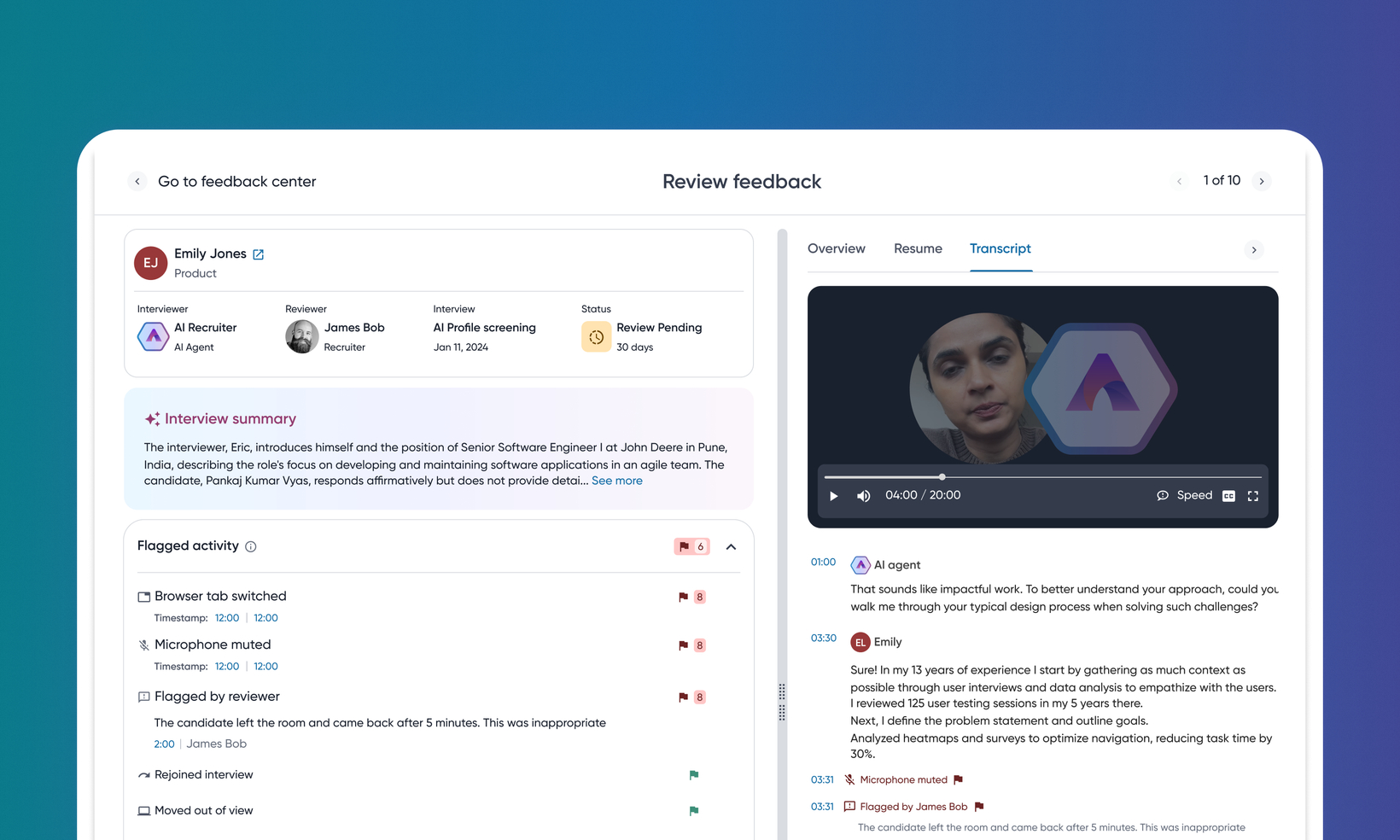
This new feature strengthens the integrity and reliability of AI interviews, building essential trust with customers. This update introduces a system for detecting and logging irregular candidate behavior during an interview, providing recruiters with comprehensive tools to investigate potential misconduct.
Users
Customer Admins, Recruiters, Hiring Managers
Requirements
AI Interviewer must be enabled
Value
With this feature, Eightfold offers demonstrable interview integrity by actively monitoring and flagging suspicious activities. Recruiters are equipped with tools to investigate potential use of unfair means, improving the quality of hires.
The solution incorporates detecting the following events: browser tab switching, full screen exit, microphone turn off, multiple people seen on camera, no candidate on camera, and detecting prohibited items like books. Recruiters can also manually report or dismiss suspicious events.
For information on configuring this feature, read Configure proctoring for AI Interviewer.
Note: The system flags potential misconduct but doesn't automatically disqualify candidates or alter scores. Recruiters are responsible for reviewing flagged activities and making discretionary decisions.
Impact on existing workflows
For candidates:
Candidates will encounter new mandatory disclosures before the interview, including clear communication of rules, monitored behaviors, consequences, and consent forms.
For recruiters:
The Review Feedback page will now include Flagged activity. These signals will be marked with a green flag if not triggered or a red flag if triggered, indicating suspicious activity.
Recruiters will have clickable timestamps tied to each suspicious event in the feedback form, with synchronized video and transcript playback to aid evaluation.
A Flag Activity option will be present on the transcript for manual flagging of suspicious behavior.
Initial setup
Feature can be enabled through FMT. Requesting enable will initiate a support ticket to get you the assistance you need.
Note: This feature was earlier released as pre-GA, available within Feature Management > Pre-GA. It's now available within the all features tab.
