- DATE:
- AUTHOR:
- The Eightfold team
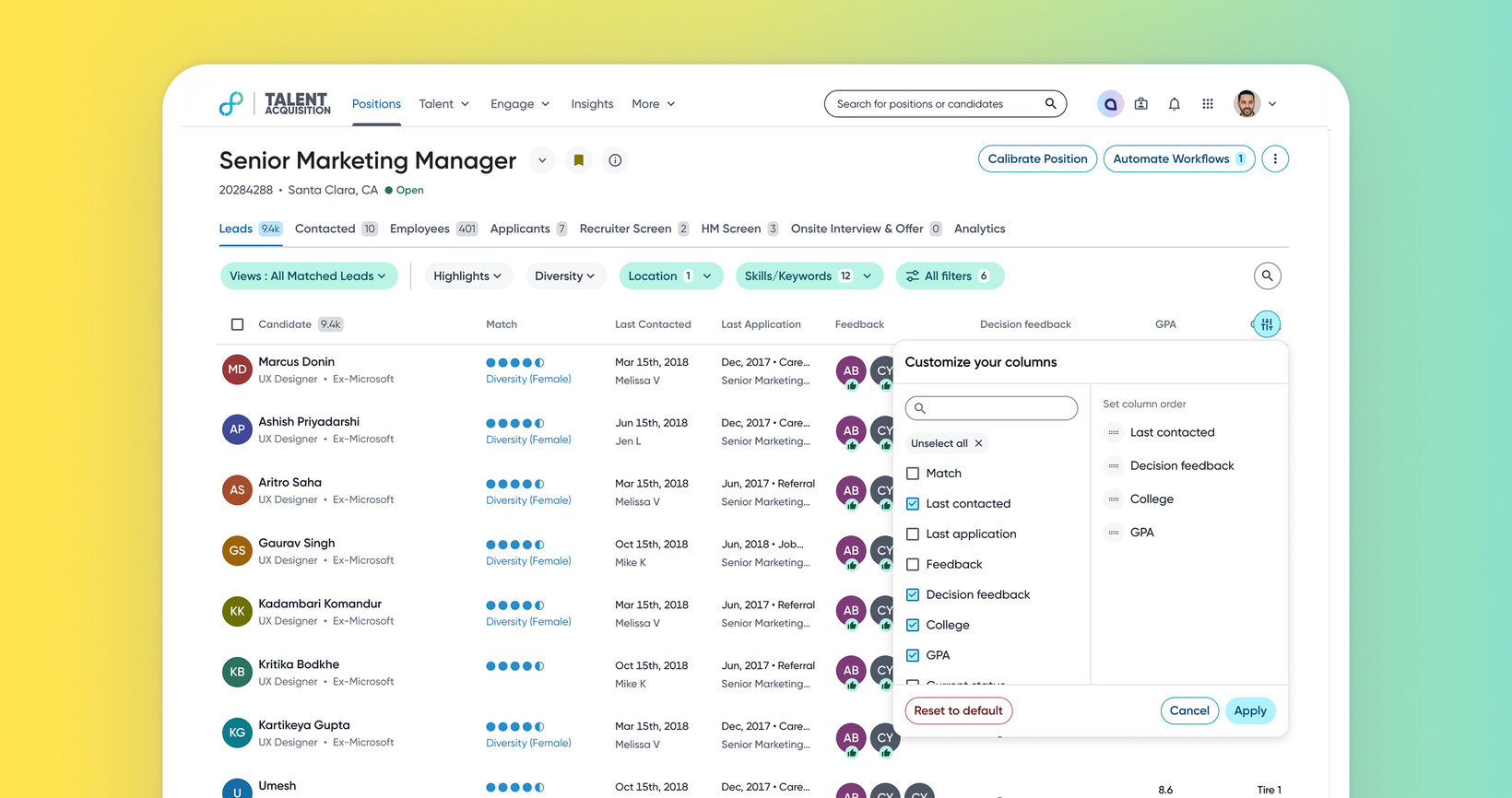
Personalized pipeline columns
Default on
This enhancement empowers users to personalize their pipeline experience by choosing which columns to display and in what order. You can now focus on the data that matters most to your specific screening and selection criteria, right within the pipeline pages. This significantly reduces the need for exporting data to external tools and streamlines your high-volume hiring processes.
Users
Recruiters, Hiring Managers, Sourcers
Value
Large organizations screen candidates based on a wide variety of criteria. This diverse data requirement may lead to many columns being configured in pipelines, making them excessively wide.
This feature enables users to configure and customize pipeline columns for Positions, Events, and Communities. They can now add, remove, and reorder columns directly on the pipeline page.
With this enhancement, users can focus on the specific data that matters to them, significantly reducing the need to export data and perform manual activities.
Impact on existing workflows
The enhancement is available for pipelines within Positions, Events, and Communities modules.
Clicking the ‘column edit’ button opens a dedicated modal that allows users to directly customize their column view by adding, removing, and reordering columns.
Initial setup
This feature will be available to customers by default. Customers don't need to do anything to see this change in their Eightfold environment by the sandbox and GA dates.
To know more about this feature, see this video:
